> ## Documentation Index
> Fetch the complete documentation index at: https://portkey-docs-fix-fal-ai-image-generation.mintlify.site/llms.txt
> Use this file to discover all available pages before exploring further.
# Rate Limits
> Throttle MCP tool call requests and token consumption per API key, server, or tool.
Requires **Gateway v2.18.0+** and **Backend v1.24.0+**.
Rate limits control the volume of MCP tool calls across your organization. You can limit by request count or token consumption, scoped to specific servers, tools, or API keys.
MCP rate limits use the same policy engine as LLM rate limits, with a new `target` field set to `mcp_tools`. This keeps MCP and LLM policies separate — existing LLM rate limits are unaffected.
***
## How It Works
MCP rate limit policies are workspace-scoped. When a tool call comes through the MCP Gateway, Portkey checks all active `mcp_tools` rate limit policies for that workspace. If any policy's limit has been reached, the request is rejected with a rate limit error.
Policies support two limit types:
* **Requests** — Limit the number of tool calls (per minute, hour, or day)
* **Tokens** — Limit token consumption (per minute, hour, or day)
***
## Supported Condition and Group-By Keys
Conditions determine **which requests** a policy applies to. Group-by keys determine **how limits are bucketed** — each unique combination gets its own counter.
| Key | Description | Example Value |
| -------------- | ------------------------- | ----------------------------------------- |
| `api_key` | Match by API key ID | `"uuid_of_api_key"` |
| `workspace_id` | Match by workspace ID | `"workspace_uuid"` |
| `mcp_server` | Match by MCP server slug | `"slack"`, `"github"` |
| `mcp_tool` | Match by tool name | `"send_message"`, `"create_issue"` |
| `metadata.*` | Match by request metadata | `"metadata._user"` with value `"user123"` |
`api_key` is not available in OAuth-based MCP flows, since those requests are authenticated via identity provider tokens and do not carry an API key. Use `mcp_server`, `mcp_tool`, or `metadata.*` keys instead.
### Conditions
Conditions filter which requests a policy applies to. All conditions must match (AND logic). Each condition supports:
| Field | Type | Description |
| ---------- | ------------------- | ---------------------------------------------------------------- |
| `key` | string | The dimension to match against |
| `value` | string \| string\[] | Value(s) to match (OR logic for arrays). Use `"*"` for wildcard. |
| `excludes` | string \| string\[] | Value(s) to exclude from matching |
### Group-By
Group-by keys determine how limits are tracked independently. For example, grouping by `api_key` means each API key gets its own counter — one key hitting the limit doesn't affect others.
***
## Rate Limit Units
| Unit | Description |
| ----- | -------------------------- |
| `rpm` | Requests/Tokens per minute |
| `rph` | Requests/Tokens per hour |
| `rpd` | Requests/Tokens per day |
| `rpw` | Requests/Tokens per week |
***
## Use Cases
### Use Case 1: Global MCP Rate Limit
Limit all MCP tool calls in a workspace to 500 requests per minute.
```json theme={null}
{
"name": "Global MCP rate limit",
"target": "mcp_tools",
"type": "requests",
"unit": "rpm",
"value": 500,
"conditions": [
{ "key": "api_key", "value": "*" }
],
"status": "active"
}
```
***
### Use Case 2: Per-User MCP Rate Limit
Limit each user (identified by `_user` metadata) to 50 MCP tool calls per minute.
```json theme={null}
{
"name": "Per-user MCP rate limit",
"target": "mcp_tools",
"type": "requests",
"unit": "rpm",
"value": 50,
"conditions": [
{ "key": "metadata._user", "value": "*" }
],
"group_by": [
{ "key": "metadata._user" }
],
"status": "active"
}
```
***
### Use Case 3: Per-Server Rate Limit
Cap total throughput to the Slack MCP server to 1000 requests per hour.
```json theme={null}
{
"name": "Slack server rate limit",
"target": "mcp_tools",
"type": "requests",
"unit": "rph",
"value": 1000,
"conditions": [
{ "key": "mcp_server", "value": "slack" }
],
"status": "active"
}
```
***
### Use Case 4: Limit a Specific Tool
Throttle the `send_message` tool to 100 calls per minute, regardless of which server it's on.
```json theme={null}
{
"name": "send_message rate limit",
"target": "mcp_tools",
"type": "requests",
"unit": "rpm",
"value": 100,
"conditions": [
{ "key": "mcp_tool", "value": "send_message" }
],
"status": "active"
}
```
***
### Use Case 5: Per-Server Token Limit
Limit token consumption on the GitHub MCP server to 500,000 tokens per day.
```json theme={null}
{
"name": "GitHub server token limit",
"target": "mcp_tools",
"type": "tokens",
"unit": "tpd",
"value": 500000,
"conditions": [
{ "key": "mcp_server", "value": "github" }
],
"status": "active"
}
```
***
### Use Case 6: Per-API-Key Limits Grouped by Server
Give each API key its own rate limit, tracked independently per MCP server.
```json theme={null}
{
"name": "Per-key per-server MCP limit",
"target": "mcp_tools",
"type": "requests",
"unit": "rpm",
"value": 100,
"conditions": [
{ "key": "api_key", "value": "*" }
],
"group_by": [
{ "key": "api_key" },
{ "key": "mcp_server" }
],
"status": "active"
}
```
***
### Use Case 7: Per-Team Rate Limit by Server
Track and limit MCP usage separately for each team and server combination.
```json theme={null}
{
"name": "Per-team per-server MCP limit",
"target": "mcp_tools",
"type": "requests",
"unit": "rph",
"value": 500,
"conditions": [
{ "key": "metadata._team", "value": "*" }
],
"group_by": [
{ "key": "metadata._team" },
{ "key": "mcp_server" }
],
"status": "active"
}
```
***
### Use Case 8: Exclude Specific Tools from a Server Limit
Apply rate limit to all Slack tools except `list_channels`.
```json theme={null}
{
"name": "Slack tools limit (excluding list_channels)",
"target": "mcp_tools",
"type": "requests",
"unit": "rpm",
"value": 200,
"conditions": [
{ "key": "mcp_server", "value": "slack" },
{ "key": "mcp_tool", "value": "*", "excludes": "list_channels" }
],
"status": "active"
}
```
***
## Creating a Policy
You can create MCP rate limit policies from the Portkey UI or via the Admin API.
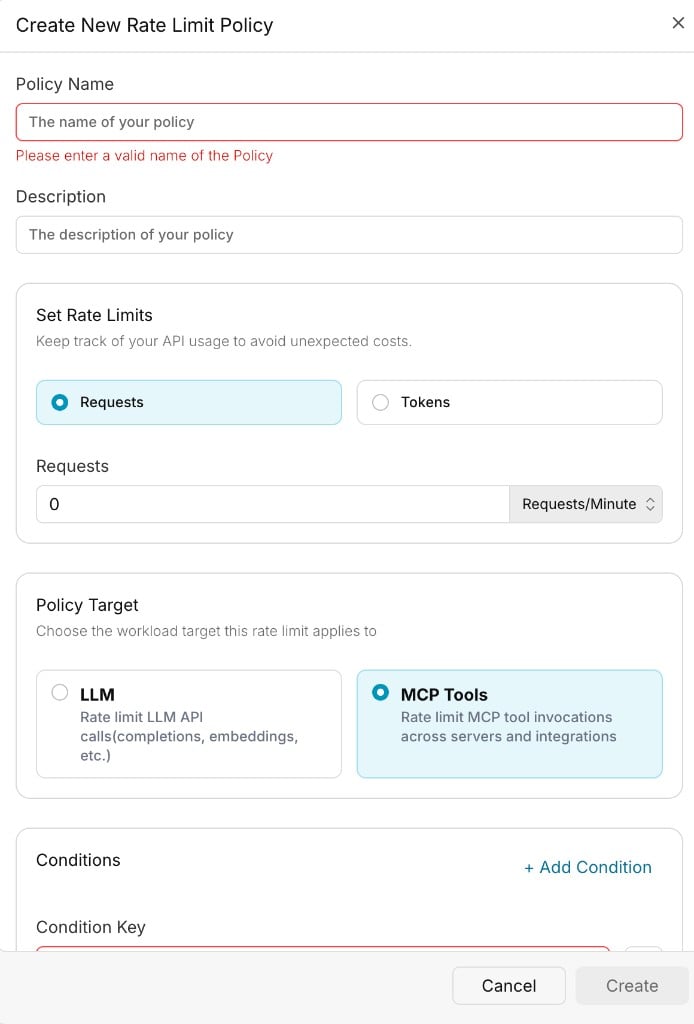 Use the Admin API to create a rate limit policy with `target` set to `mcp_tools`.
```bash cURL theme={null}
curl -X POST "https://api.portkey.ai/v1/policies/rate-limits" \
-H "x-portkey-api-key: $PORTKEY_API_KEY" \
-H "Content-Type: application/json" \
-d '{
"name": "Slack send_message limit",
"description": "Throttle send_message calls on the Slack MCP server",
"target": "mcp_tools",
"type": "requests",
"unit": "rpm",
"value": 100,
"conditions": [
{ "key": "mcp_tool", "value": "send_message" }
],
"group_by": [
{ "key": "api_key" }
]
}'
```
***
## Key Considerations
* **Target is immutable.** A policy's `target` cannot be changed after creation. To switch between `llm` and `mcp_tools`, archive the existing policy and create a new one.
* **Existing policies are unaffected.** All existing rate limit policies default to `target: llm`. No migration is needed.
* **OAuth flows and `api_key`.** The `api_key` condition and group-by key is not available in OAuth-based MCP flows. Use `mcp_server`, `mcp_tool`, `workspace_id`, or `metadata.*` instead.
* **Workspace-scoped only.** MCP rate limit policies are scoped to the workspace level. Org-wide MCP policies are not supported in this release.
***
## Exceeding Rate Limits
When a rate limit is exceeded, Portkey returns a **429 Too Many Requests** HTTP status code.
* The error message indicates which limit was exceeded
* The limit resets automatically after the configured time interval
***
## Next Steps
Full policy reference with conditions, group-by, and validation rules.
API reference for creating and managing rate limit policies.
Monitor MCP tool call logs and usage analytics.
Control which workspaces and users can access MCP servers.
***
Contact Us
Use the Admin API to create a rate limit policy with `target` set to `mcp_tools`.
```bash cURL theme={null}
curl -X POST "https://api.portkey.ai/v1/policies/rate-limits" \
-H "x-portkey-api-key: $PORTKEY_API_KEY" \
-H "Content-Type: application/json" \
-d '{
"name": "Slack send_message limit",
"description": "Throttle send_message calls on the Slack MCP server",
"target": "mcp_tools",
"type": "requests",
"unit": "rpm",
"value": 100,
"conditions": [
{ "key": "mcp_tool", "value": "send_message" }
],
"group_by": [
{ "key": "api_key" }
]
}'
```
***
## Key Considerations
* **Target is immutable.** A policy's `target` cannot be changed after creation. To switch between `llm` and `mcp_tools`, archive the existing policy and create a new one.
* **Existing policies are unaffected.** All existing rate limit policies default to `target: llm`. No migration is needed.
* **OAuth flows and `api_key`.** The `api_key` condition and group-by key is not available in OAuth-based MCP flows. Use `mcp_server`, `mcp_tool`, `workspace_id`, or `metadata.*` instead.
* **Workspace-scoped only.** MCP rate limit policies are scoped to the workspace level. Org-wide MCP policies are not supported in this release.
***
## Exceeding Rate Limits
When a rate limit is exceeded, Portkey returns a **429 Too Many Requests** HTTP status code.
* The error message indicates which limit was exceeded
* The limit resets automatically after the configured time interval
***
## Next Steps
Full policy reference with conditions, group-by, and validation rules.
API reference for creating and managing rate limit policies.
Monitor MCP tool call logs and usage analytics.
Control which workspaces and users can access MCP servers.
***
Contact Us